econ-viz
Overview
econ-viz is a Python package I built for drawing microeconomics teaching diagrams. Give it a utility function, prices, and income — it solves for the equilibrium, renders the indifference map and budget line, and exports to PNG, PDF, or SVG.
The motivation was straightforward: drawing these figures from scratch with matplotlib is tedious. Computing contour levels, finding tangency points, and formatting axes manually takes far longer than it should. I wanted a tool where I describe the model and let the library handle the rest.
Current version: v1.4.0 · Test coverage: 99% · Tests: 235 passed
Features
Eight built-in utility models
Covering the full range of standard microeconomic preferences:
| Model | Class |
|---|---|
| Cobb-Douglas | CobbDouglas(alpha, beta) |
| Leontief (perfect complements) | Leontief(a, b) |
| Perfect Substitutes | PerfectSubstitutes(a, b) |
| CES | CES(alpha, rho) |
| Quasi-Linear | QuasiLinear(alpha) |
| Stone-Geary | StoneGeary(alpha, beta, x0, y0) |
| Translog | Translog(alpha, beta, gamma) |
| Satiation | Satiation(x_sat, y_sat) |
Automatic equilibrium solving
solve() uses SLSQP and handles interior solutions, corner solutions, and Leontief kink optima. It returns a structured Equilibrium object with fields x, y, utility, and bundle_type.
Analysis tools
comparative_statics()— numerical estimation of the six Marshallian demand partial derivativesslutsky_matrix()— two-good Slutsky substitution matrix with symmetry and negative-semidefiniteness checksHomogeneityAnalyzer— homogeneity degree, Euler theorem residual, homotheticity, and degree-0 demand checks
Multi-panel figures
Figure with Layout enum (side-by-side, stacked, grid) composes multiple Canvas panels into a single figure — ideal for before/after price-change comparisons.
Demand diagrams
PricePath / IncomePath + DemandDiagram link the goods-space equilibrium locus to the Marshallian demand curve. Generates PCC and ICC teaching diagrams automatically.
LaTeX parser
Pass a LaTeX expression such as x^{0.4} y^{0.6} directly and get back a fully configured model instance.
Animation
Animator supports parameter sweeps, price sweeps, and income sweeps, exporting as GIF — useful for lecture slides and interactive documentation.
Notebook widgets
WidgetViewer in Jupyter adds a slider plus numeric input for each model parameter, so you can drag or type exact values and watch the equilibrium update live.
Installation
pip install econ-vizRequires Python 3.10 or later. Dependencies: numpy, matplotlib, scipy, sympy.
Quick Start
Minimal example
from econ_viz import Canvas, levels, solve
from econ_viz.models import CobbDouglas

model = CobbDouglas(alpha=0.5, beta=0.5)
eq    = solve(model, px=2.0, py=3.0, income=30.0)
lvls  = levels.around(eq.utility, n=5)

cvs = Canvas(x_max=20, y_max=15, x_label="x", y_label="y",
             title=r"Cobb-Douglas $x^{0.5} y^{0.5}$")
cvs.add_utility(model, levels=lvls)
cvs.add_budget(2.0, 3.0, 30.0, fill=True)
cvs.add_equilibrium(eq, show_ray=True)
cvs.save("cobb_douglas.png")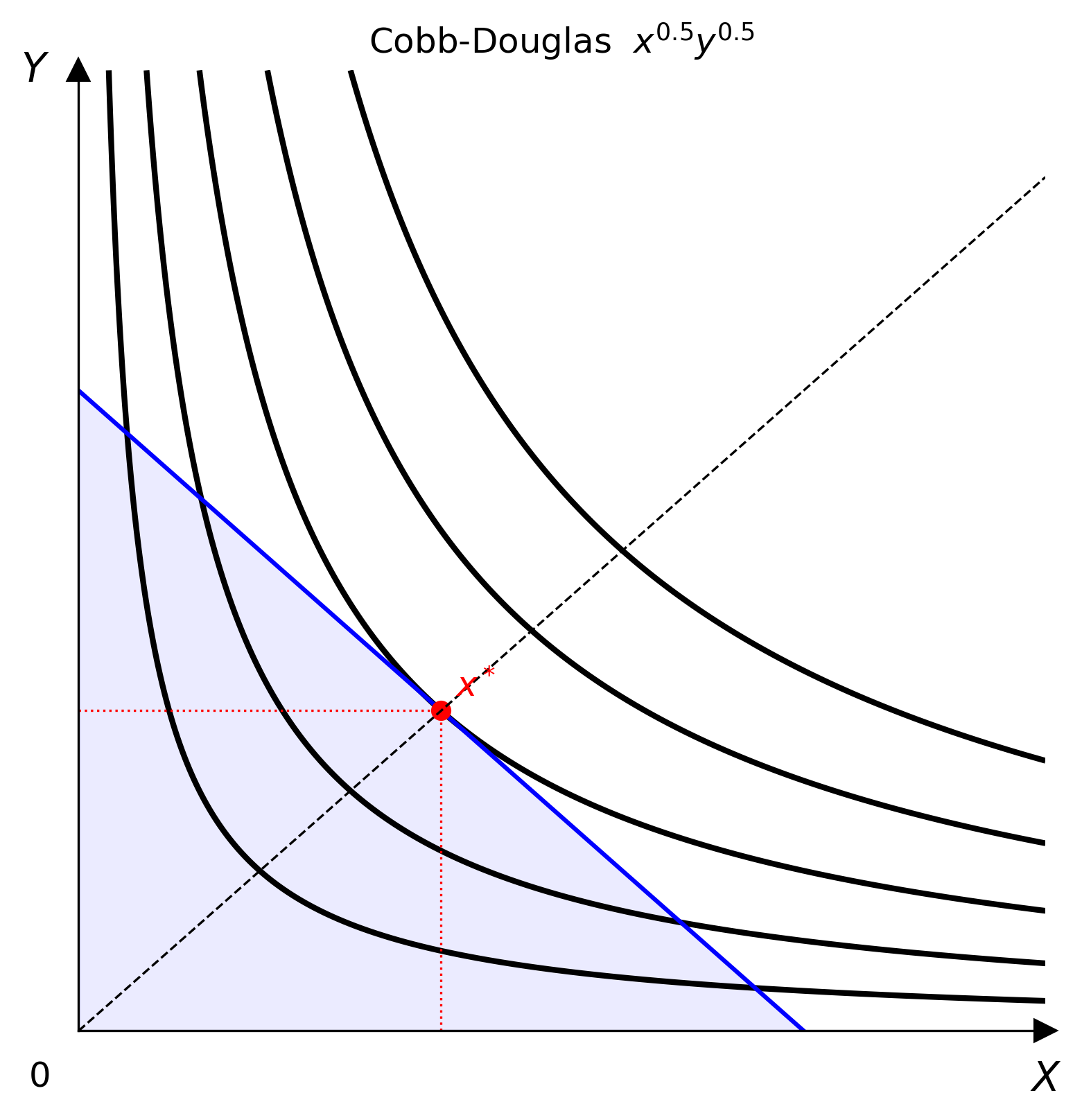
LaTeX parser
from econ_viz import parse_latex, Canvas, levels, solve

model = parse_latex(r"x^{0.4} y^{0.6}")
eq    = solve(model, px=2.0, py=3.0, income=30.0)
lvls  = levels.around(eq.utility, n=5)

Canvas(x_max=20, y_max=15) \
    .add_utility(model, levels=lvls) \
    .add_budget(2.0, 3.0, 30.0) \
    .add_equilibrium(eq) \
    .save("figure.png")
Demand diagram
from econ_viz import DemandDiagram, LinearBudget, PricePath
from econ_viz.models import CobbDouglas

model  = CobbDouglas(alpha=0.5, beta=0.5)
budget = LinearBudget(px=2.0, py=2.0, income=40.0)
path   = PricePath(model, budget=budget, price="px",
                   price_range=(0.8, 6.0), n=40)

fig = DemandDiagram(path, title="Demand: Cobb-Douglas")
fig.add_marshallian_panel(price_markers=[1.5, 4.0])
fig.save("demand.png")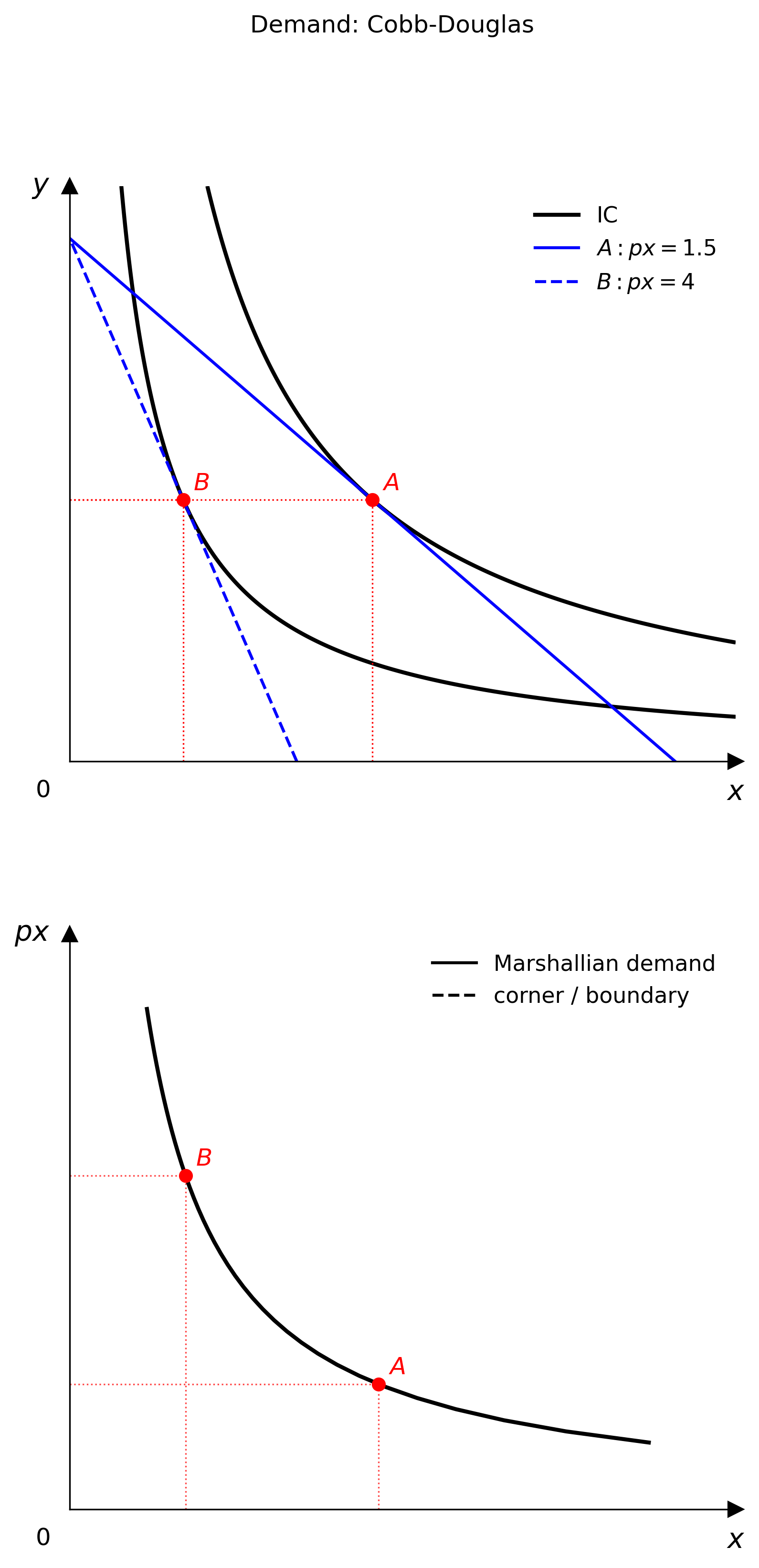
Slutsky matrix
from econ_viz import slutsky_matrix
from econ_viz.models import CobbDouglas

S = slutsky_matrix(CobbDouglas(alpha=0.4, beta=0.6),
                   px=2.0, py=3.0, income=60.0)
print(S.s_xx, S.s_xy)
print(S.s_yx, S.s_yy)
Edgeworth Box
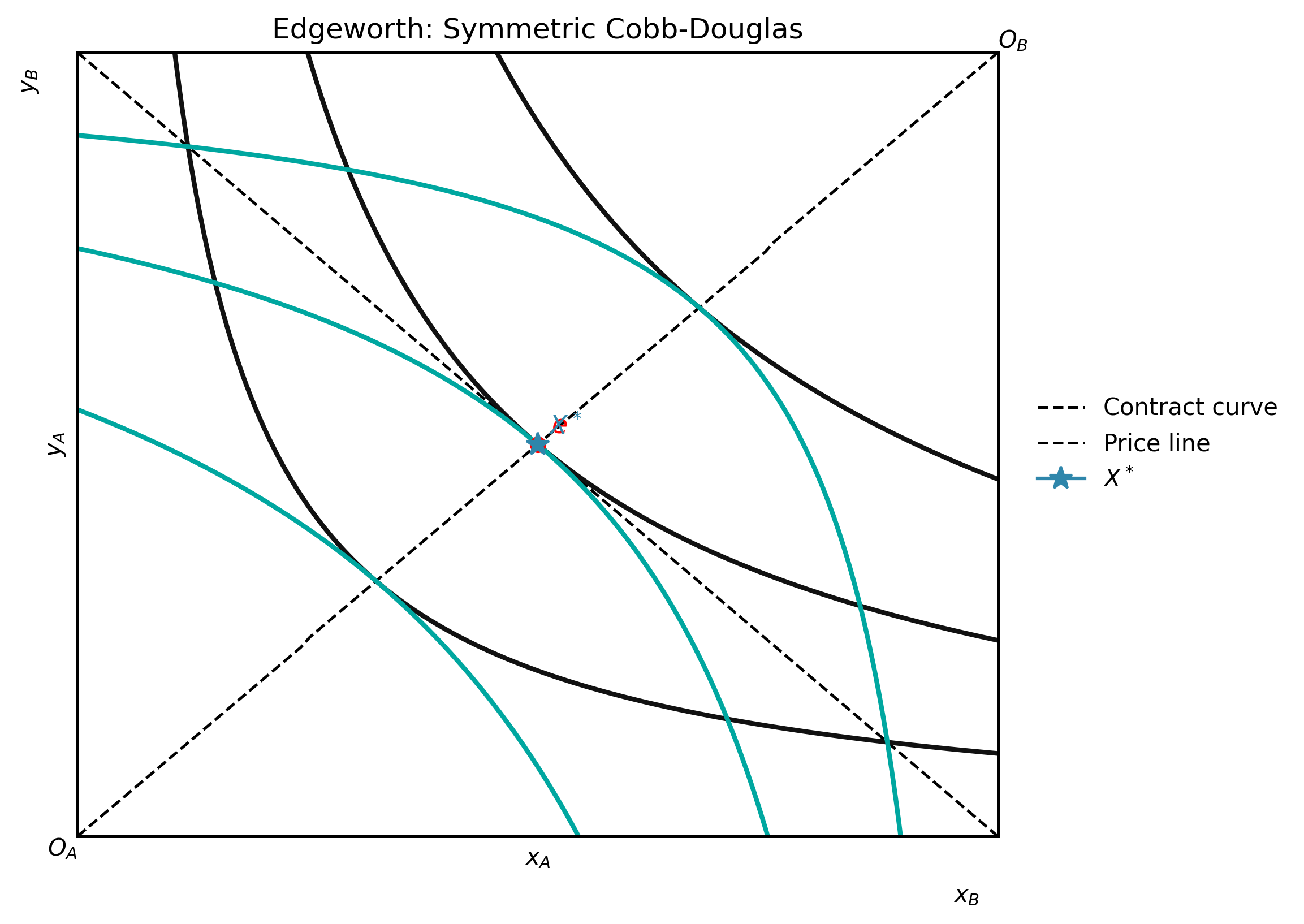
from econ_viz import EdgeworthBox, EquilibriumFocusConfig
from econ_viz.models import CobbDouglas

box = EdgeworthBox(
    CobbDouglas(alpha=0.5, beta=0.5),
    CobbDouglas(alpha=0.4, beta=0.6),
    total_x=10.0,
    total_y=8.0,
    title="Edgeworth Box",
)
(
    box.add_endowment(4.0, 3.0)
       .add_contract_curve(n=100)
       .add_core()
       .add_price_line(px=1.5, py=1.0)
       .add_walrasian_equilibrium(px=1.5, py=1.0)
       .save("edgeworth.png")
)
CLI
# List all supported models
econ-viz models

# Plot and save
econ-viz plot --model cobb-douglas --alpha 0.5 --beta 0.5 \
              --px 2 --py 3 --income 30 \
              --fill --show-ray \
              --output cobb_douglas.png

# Print closed-form Marshallian demand as LaTeX
econ-viz solve-tex --model cobb-douglas --symbolic-params